

A step-by-step guide to operate business better with OCLite
ONLINE ONBOARDING
#OCLITELEVELUP
Global Configuration
How Do I Change My Username, Email, or Password?
How Do I Manage Locations in OfficeCentral?
How to Add, Remove & Replace Users?
How to Manage Company’s Information?
How to Manage Public Holidays?
How to Log In to OfficeCentral?
How to Set User Access in OfficeCentral? (Assign Roles)
How to Manage Company Bank Account?
What Should I Do If I Forgot My Password?
HRMS
1.1 HRMS Configurations – Manage Department
1.2 HRMS Configurations – Manage Designation
1.3 HRMS Configurations – Manage Job Classifications
1.4 HRMS Configurations – Manage Approvers
2.1 Staff Management – How to Add New Staff?
2.2 Staff Management – How to Edit Staff’s Information?
2.3 Staff Management – Resign, Deactivate, Suspend & Unassign
3.1.1 Leave Setup – Step 1: Define Leave Types
3.1.2 Leave Setup – Step 2: Leave Entitlement Defaults
3.1.3 Leave Setup – Step 3: Process Leave Entitlements
3.2.1How to Manage/Approve Leave Application for Staff (HR / Admin)
Payroll
Pricebook
CRM
Accounting
1.0 Accounting Configurations – Wizards
1.1 Accounting Configurations – Accounting Period
1.2 Accounting Configurations – Reference Number
2.0 Understanding Chart of Accounts
3.0 How to Create and Manage Customer (Debtor)
3.1 How to Create and Manage Invoice
3.2 How to Create and Manage Receipt (Receive Payment)
3.3 How to Create and Manage Credit Note
3.4 How to Create and Manage Debit Note
4.0 How to Create and Manage Supplier (Creditor)
4.2 How to Create and Manage Receive Invoice
4.3 How to Create and Manage Self-Billed Invoice
4.4 How to Create and Manage Payment (Issue Payment / Payment Voucher)
4.5 How to Create and Manage Received Credit Note
How to Set User Access in OfficeCentral? (Assign Roles)
Roles determine what parts of the system a user can access.
An Admin can assign roles to each staff member to control their access.
? Access Role Settings
1️⃣ Go to Global Configurations > Users > Role Groups

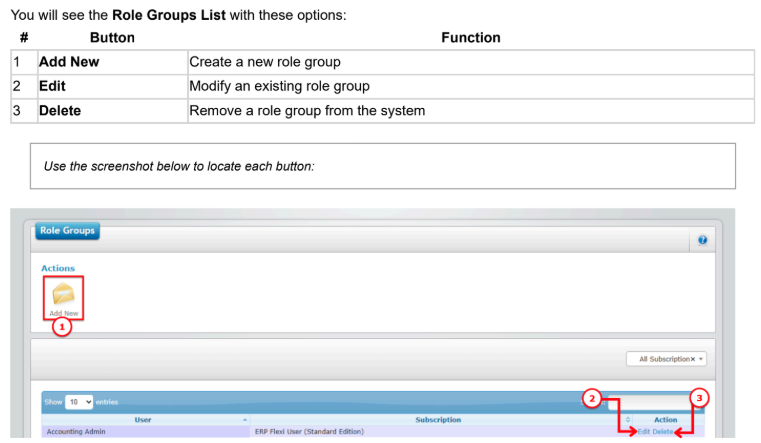
➕ How to Add a New Role Group
1️⃣ Click Add New
2️⃣ Fill in the details:
| # | Field | What to Enter |
|---|---|---|
| 1 | Role Group Name | Give a suitable name for the role group (e.g., Admin, HR, Payroll) |
| 2 | Subscription | Choose the subscription/module(s) this group should have access to |
| 3 | Choose Access | Admin may restrict user’s access by selecting specific access |
| 4 | Save | Click Save to create the role group |
3️⃣ After saving, the new role group will appear in the Role Groups List.
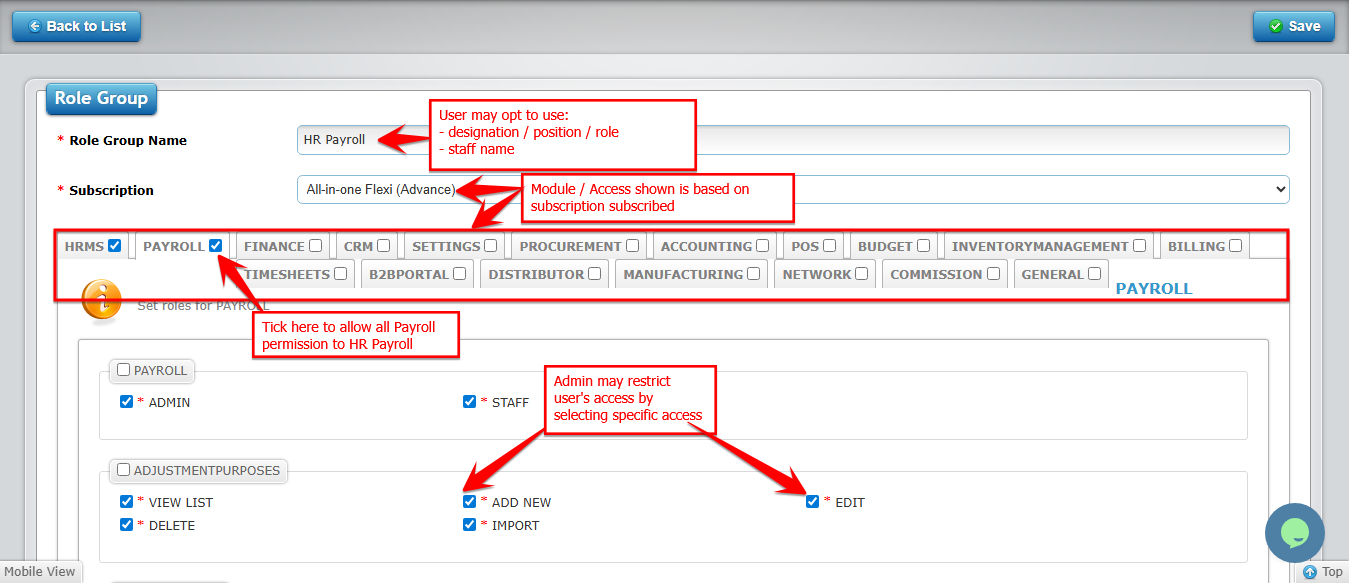
✏️ How to Edit a Role Group
1️⃣ Click Edit next to the role group you want to modify
2️⃣ Update the Role Group Name or Subscription
3️⃣ Click Save to apply changes
How to Delete a Role Group
1️⃣ Click Delete next to the role group
2️⃣ Confirm deletion
⚠️ Deleting a role group will remove all permissions associated with it. Make sure no active users rely on it before deleting.