
ONLINE ONBOARDING
Step-by-step tutorials to help you get started with OCLite faster.
Step 1: Global Configuration
Step 2: HRMS
1. HRMS Configurations – Manage Department
2. HRMS Configurations – Manage Designation
3. HRMS Configurations – Manage Job Classifications
4. Staff Management – How to Add New Staff?
5. Staff Management – How to Edit Staff’s Information?
6. Leave Setup – Step 1: Define Leave Types
7. Leave Setup – Step 2: Leave Entitlement Defaults
Step 3: Payroll
Step 4: Accounting
1. Accounting Configurations – Wizards
2. Accounting Configurations – Accounting Period
3. Understanding Chart of Accounts
4. How to Create and Manage Customer (Debtor)
5. How to Create and Manage Invoice
6. How to Create and Manage Receipt (Receive Payment)
7. How to Create and Manage Credit Note
8. How to Create and Manage Debit Note
9. How to Create and Manage Supplier (Creditor)
10. How to Create and Manage Receive Invoice
11. How to Create and Manage Self-Billed Invoice
12. How to Create and Manage Payment (Issue Payment / Payment Voucher)
13. How to Create and Manage Received Credit Note
Step 5: Pricebook
Step 6: CRM
Step 7: POS
Step 8: System Enhancements (Optional)
Global Configuration
1. How Do I Change My Username, Email, or Password?
2. How to Set Reports Template?
4. What Should I Do If I Forgot My Password?
HRMS
1. HRMS Configurations – Manage Approvers
2. Staff Management – Resign, Deactivate, Suspend & Unassign
PAYROLL
1. Manage Adjustments – Adjustment Purposes
2. Manage Adjustments – Add Adjustment Individually
CRM
1. Contact Book Overview (Leads, Accounts and Contacts)
3. Financial Transactions Overview
ACCOUNTING
Step 9: OC Lite Beginner Certification
Complete all onboarding modules to unlock and download your Beginner Digital Certificate.
How to Manage Phone Calls
This guide explains how to add, view, edit, and delete phone calls in CRM.
Phone Calls help you track communication history with leads, and contacts for better follow-up and record keeping.
Where to Access CRM
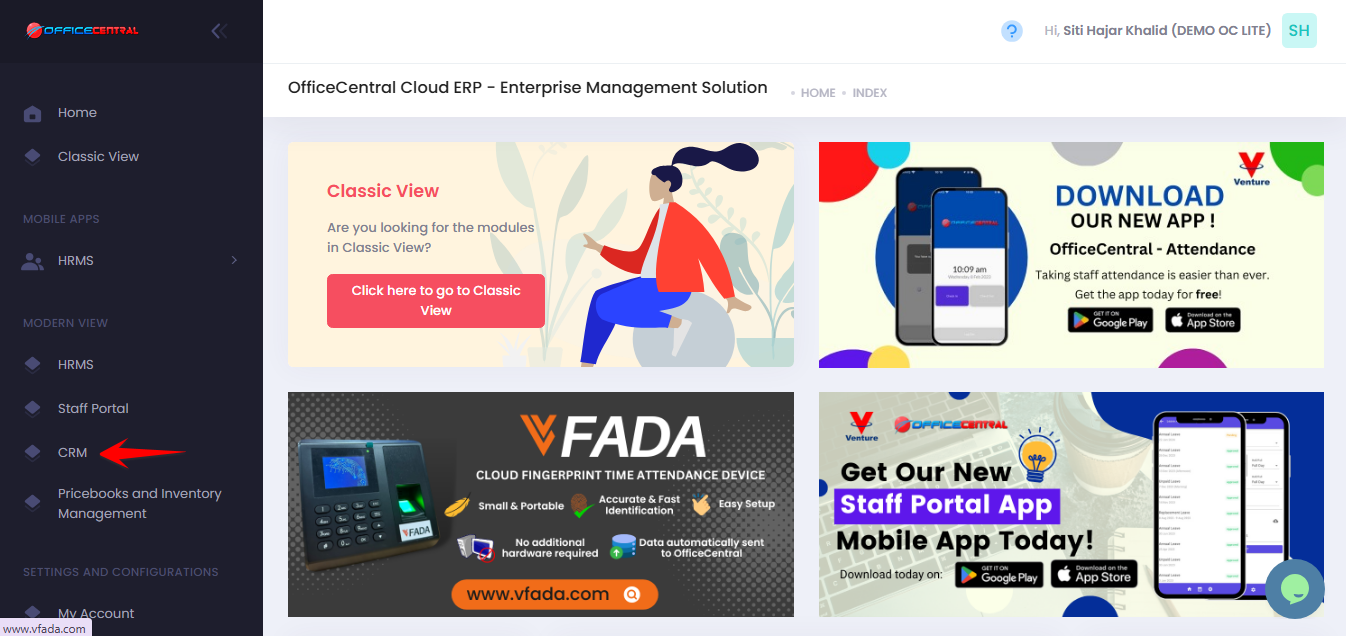
Where to Access This Function
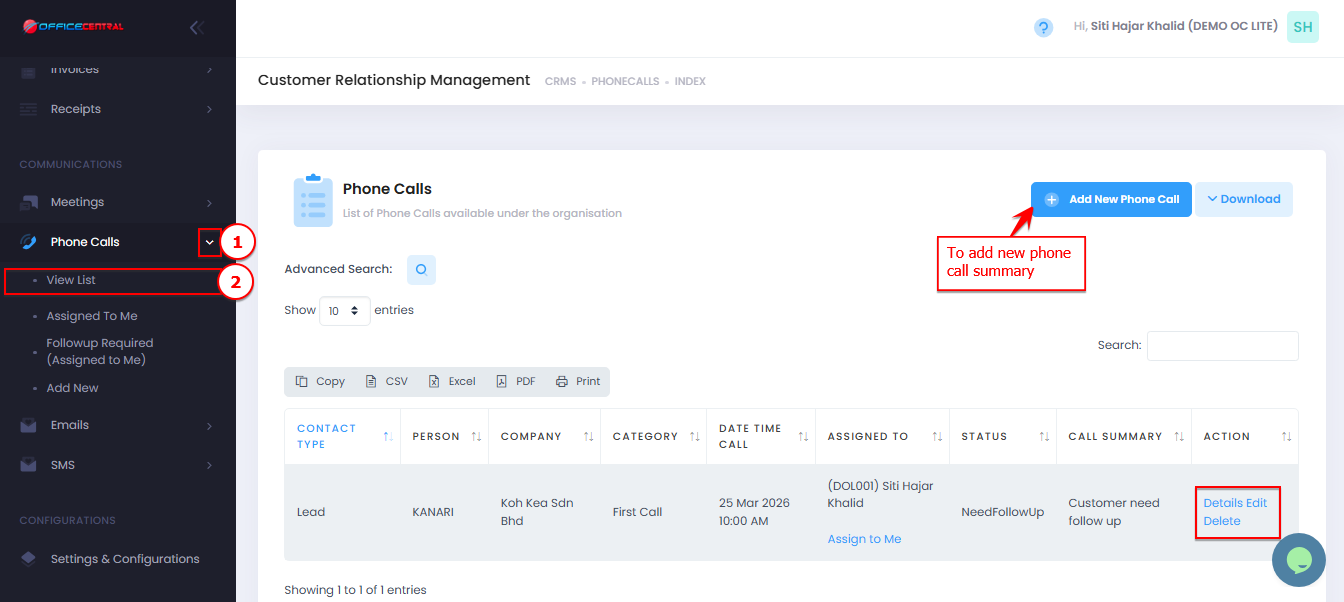
On the Phone Calls View List page, you will see:
| No. | Function | Description |
|---|---|---|
| 1 | Add | Create a new phone call record |
| 2 | Edit | Update phone call details |
| 3 | Delete | Remove a phone call record |
| 4 | Details | View full phone call information |
Use the screenshot below to locate these buttons.
How to Add New Phone Call
-
Go to Phone Calls > View List
-
Click Add New Phone Call
-
Fill in the required information below:
1. Contact
| Field | Description |
|---|---|
| Contact * | Select contact (PIC) |
| Add New Contact | Add contact if not available |
2. Report
| Field | Description |
|---|---|
| Call Summary / Problem Description | Brief summary of the call or issue |
| Notes / Cause of the Problems | Details or root cause |
| Action Taken / Solution Given | Action taken or solution provided |
3. Call Information
| No. | Field | Description |
|---|---|---|
| 1 | Date Time Call * | Date and time of the call |
| 2 | Type * | Inbound / Outbound |
| 3 | Category * | Main call category. To add more phone call categories, please refer CRM Configurations – Phone Call Categories |
| 4 | Sub-Category * | More specific classification. To add more phone call categories, please refer CRM Configurations – Phone Call Categories |
| 5 | Assigned To * | Staff responsible for the call |
| 6 | Status * | Call status (e.g., Open, Closed) |
4. Click Save Form after completing required fields (*).
How to View Phone Call Details
-
Go to Phone Calls > View List
-
Click Details next to the phone call summary
-
Review:
-
Call information
-
Contact / PIC
-
Call Summary / Problem Description
-
Notes / Cause of the Problems
-
Action Taken / Solution or Guide Given
-
Status
-
How to Edit Phone Call
-
Go to Phone Calls > View List
-
Click Edit next to the phone call summary
-
Update necessary details
-
Click Save Form
How to Delete Phone Call
-
Go to Phone Calls > View List
-
Click Delete next to the phone call summary
-
Confirm deletion
⚠️ Deleted records cannot be recovered.